A Power Dialler Workflow That Doubles Talk Time
By Jamila Parker · · 8 min read

A practical power dialler workflow for sales teams that want more live conversations without sacrificing research, call quality, CRM hygiene or compliance.
Key takeaways
- Use a power dialler to remove dead time between calls, not to remove judgement from the sales process.
- Clean lists, pre-call context and fast post-call dispositions matter as much as dial speed.
- Keep one live call per available rep so every answered call reaches a person immediately.
- Automate low-value admin while preserving notes, next actions and do-not-call handling.
- Measure live conversations and qualified outcomes, not just dials per hour.
What A Power Dialler Workflow Actually Changes
A power dialler automatically places the next call in a prepared list when a rep becomes available. Unlike a predictive dialler, the usual power-dialler model is one call for one available rep, so the rep is ready when the prospect answers. The productivity gain comes from removing repetitive work between calls: Finding the next record, Copying the number, Dialling, waiting, Logging the attempt and Moving to the next contact.
The strongest power dialler workflow does not turn sales into a volume contest. It creates a controlled rhythm in which the rep spends less time on mechanics and more time in live conversation. That distinction matters because talk time is only valuable when the list is relevant, caller identity is trustworthy, and the rep knows enough about the account to have a useful first thirty seconds.
For B2B teams, the practical target is a workflow that preserves one-to-one conversation quality while compressing the gaps around it. If a dialler saves twenty or thirty seconds per attempt across a long calling block, the accumulated time can become additional live conversations without requiring the rep to rush the calls themselves.
Start With A List The Rep Can Actually Work
A fast dialler amplifies whatever is in the list. If the data is stale, duplicated or poorly segmented, the team reaches bad records faster. Before a session begins, remove obvious duplicates, suppress contacts who should not be called, verify the fields the rep relies on, and segment by a useful reason for calling.
The list should give the rep enough context to avoid opening every call from zero. Useful fields can include company, role, recent activity, source, territory, current opportunity status and the specific trigger behind the outreach. The goal is not a twenty-minute research brief for every record. It is a compact set of facts that lets the rep recognise who is answering and why the call belongs in today’s session.
A power dialler workflow is strongest when each calling block has one purpose. Mixing renewal calls, brand-new cold prospects, missed inbound leads and event follow-ups into the same queue creates abrupt context switching. Separate lists let the rep use a tighter opening, more relevant objection handling and a clearer disposition set.
Build A Pre-Call Screen That Takes Seconds To Read
When the next record appears, the rep should be able to understand it at a glance. Put the most useful information above the fold: Account name, Contact role, Location or Time zone, Reason for outreach, Last activity and Any warning such as an existing open opportunity or do-not-call restriction.
Do not force the rep to open five tabs before the call. If a CRM and dialler are integrated, the dialler view should surface the handful of fields that change the conversation. Everything else can remain available for deeper discovery after the contact answers.
This is where the power dialler workflow protects call quality. The automation handles movement between records; the pre-call screen restores enough human context that the next conversation does not sound automated.
Use A Tight Calling Loop
- Open the calling block with a clean, prioritised list and a single objective.
- Give the rep a short preview of the next contact before dialling begins.
- Dial one contact for each available rep so an answered call never waits for an agent.
- When the call ends, require a small outcome set and capture the next action immediately.
- Auto-schedule simple follow-ups where the disposition makes the next step obvious.
- Move to the next record without asking the rep to rebuild the workflow manually.
The wrap-up window is one of the easiest places to lose the time the dialler just saved. A rep should not need two minutes to complete fifteen CRM fields after every no-answer. Mechanical outcomes such as no answer, busy or invalid number can often be kept extremely simple, while live conversations justify a short note and a clear next step.
If a call results in a meeting, callback or meaningful objection, allow enough wrap time to record it properly. The purpose of automation is not to create bad CRM data faster.
Keep Call Dispositions Small And Actionable
A useful power dialler workflow relies on dispositions that tell the system what should happen next. Avoid a long dropdown full of overlapping labels. A compact set such as no answer, voicemail, connected-not interested, callback requested, meeting booked, wrong number and do not call is easier to use consistently.
Every code should have a consequence. Callback requested should create a dated task. Do not call should suppress future dialling. Wrong number should flag the data for correction. Meeting booked should update the lead or opportunity and stop the contact from remaining in the same outbound sequence.
This turns the dialler into a closed operational loop: The rep makes a call, records the outcome, and the system prepares the correct next step.
Separate Talk-Time Gains From Raw Dial Volume
The easiest dialler metric to celebrate is dials per hour, but that number can be misleading. A rep can produce a high dial count from an inaccurate list and create almost no useful conversations. Measure the part of the workflow that reflects customer contact.
- Live conversations per calling hour.
- Qualified conversations per hundred dials.
- Meetings or next steps created from connected calls.
- Average wrap time after no-answer versus live conversations.
- Wrong-number and invalid-data rate.
- Do-not-call requests and complaint signals.
- Caller-ID answer rate by number or campaign.
If live conversations rise while quality outcomes remain stable or improve, the power dialler workflow is doing useful work. If dials rise but answer quality, meetings or data hygiene deteriorate, the system is simply accelerating waste.
Use Calling Blocks Instead Of All-Day Dialling
Power dialling works best in focused sessions. A rep can prepare a segment, call for a defined block, then step out of the dialler to handle research, email follow-up, meetings and deeper account work. This preserves intensity without turning the entire day into repetitive outbound activity.
Calling windows should reflect the prospect’s local time and the applicable marketing rules. International teams should route lists and schedules by time zone rather than relying on the rep to calculate local time manually for every record.
Blocks also make coaching easier. Managers can compare list quality, connect rates and outcomes from one session to another, then change the data or opening rather than asking the rep to “make more calls” in the abstract.
Protect Caller Identity And Number Reputation
A power dialler can increase call volume quickly, which means weak practices become visible quickly too. Use accurate caller ID, maintain a sensible number strategy and monitor whether particular numbers experience declining answer rates or spam-labelling problems.
Do not rotate numbers simply to defeat recipient preferences or spam controls. That may create short-term volume while damaging trust and increasing compliance risk. Instead, maintain clean suppression lists, honour objections and keep calling behaviour aligned with the market and jurisdiction.
In the United States, telemarketing requirements can include Caller ID, calling-time, do-not-call and abandonment rules depending on the campaign. In the UK, PECR rules apply to live marketing calls and require organisations to respect TPS/CTPS registrations and previous objections. The exact obligations depend on the audience and jurisdiction, so the workflow should include a compliance review rather than treating the dialler as only a productivity tool.
Try this on your own numbers
Local numbers in 118 countries, AI call notes and one shared inbox. Live the same day, no contract.
Where The “Double Talk Time” Comes From
The phrase “double talk time” should be treated as an operational goal, not a guaranteed product claim. The mechanism is straightforward: If a rep spends a large share of a manual calling block locating records, dialling, waiting and logging simple outcomes, a power dialler can compress those gaps. Whether the final talk-time increase is 20 per cent, 50 per cent or more depends on the team’s starting process, answer rate and list quality.
The cleanest way to measure it is with a before-and-after test. Take the same rep group, similar list segments and comparable calling windows. Measure live conversation minutes per hour before the dialler workflow and after it. Keep quality metrics beside the time metric so productivity does not hide worse customer outcomes.
A successful power dialler workflow gives reps more conversations without making those conversations feel more mechanical. That is the standard worth optimising for.
How To Roll The Workflow Out Without Breaking The Team
Start with one small calling pod rather than switching every rep at once. Give the pilot group a clean list, a limited disposition set and a short operating guide. Compare the new workflow with the team’s previous manual process for at least several sessions before changing targets.
Collect rep feedback about where the dialler creates friction. If the next record appears too quickly, context suffers. If wrap time is too long, the efficiency gain disappears. If too many records contain missing fields, fix the data upstream instead of teaching reps to work around it.
Once the pilot is stable, document the list criteria, pre-call fields, call windows, dispositions, follow-up rules and compliance checks. A power dialler workflow becomes scalable when the process is clear enough that a new rep can follow it without guessing.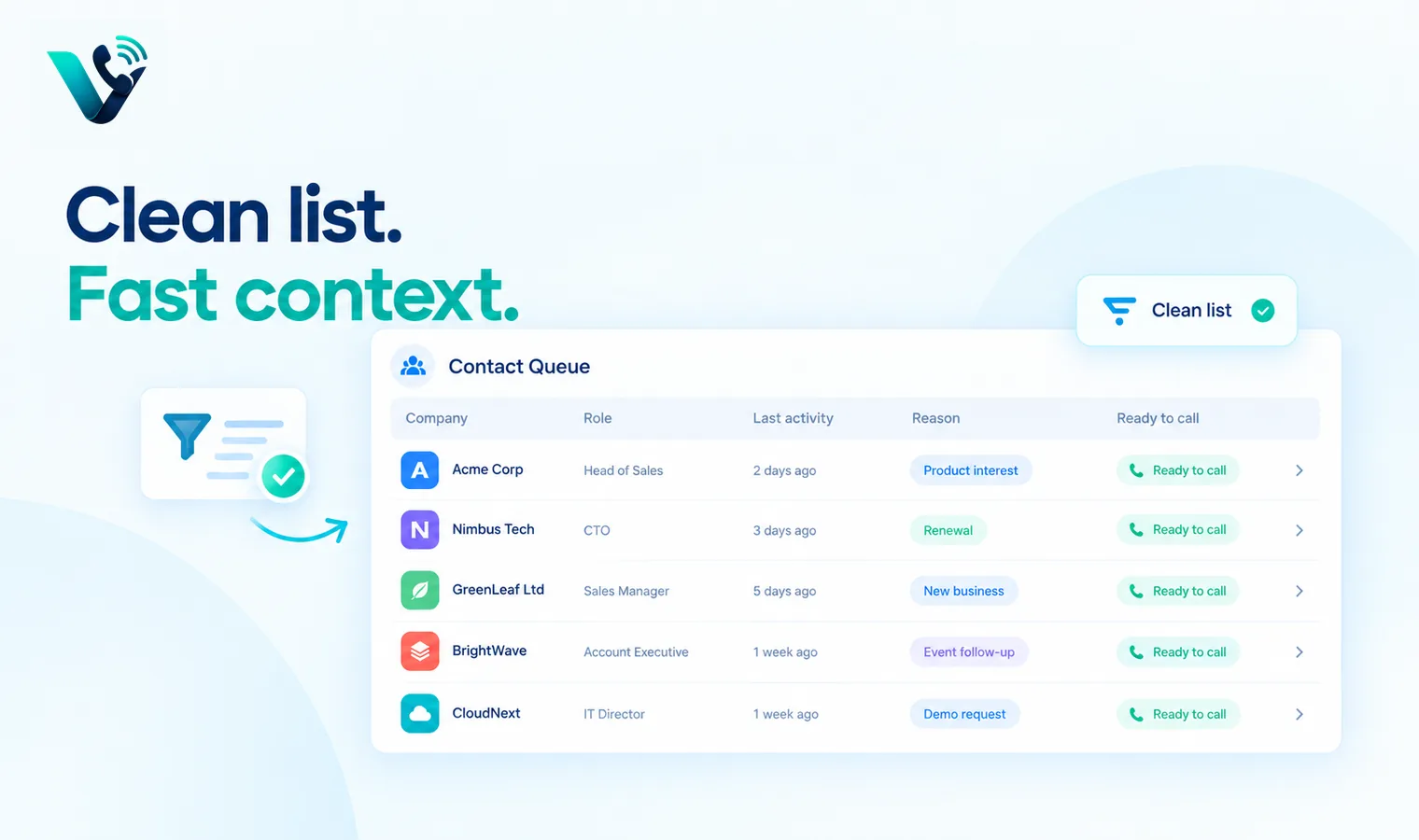
Frequently asked questions
- What is a power dialler?
- A power dialler automatically calls the next contact for an available rep, reducing manual dialling and idle time between attempts.
- How is a power dialler different from a predictive dialler?
- A power dialler generally places one call per available rep. A predictive dialler may dial ahead of agent availability and can create abandoned or delayed connections if pacing is too aggressive.
- Can a power dialler double talk time?
- It can materially increase live conversation time when manual dialling and post-call admin consume a large share of the session, but the result depends on list quality, answer rate and the starting workflow.
- What metrics should a power dialler team track?
- Track live conversations per hour, qualified outcomes, meetings, wrap time, data-quality errors, do-not-call requests and number-level answer rates.
- How many disposition codes should a dialler use?
- Use a small set that changes the next action. Too many overlapping codes slow reps down and make reporting inconsistent.
- Is power dialling legal?
- The technology itself is not the whole legal question. Calling rules vary by jurisdiction, audience, consent, number type and campaign purpose. Review applicable telemarketing and privacy rules before launch.