Voicemail to email vs shared inbox: which workflow is better?
By Jamila Parker · · 14 min read

Voicemail to email is simple; a shared inbox is more collaborative. Compare both workflows for ownership, speed, visibility and reporting.
Key takeaways
- Voicemail to email is usually best when one person or a very small team owns callbacks and needs a simple notification workflow.
- A shared inbox becomes more useful when several people handle the same business number and need assignment, status, visibility and accountability.
- The biggest difference in voicemail to email vs shared inbox is not message delivery; it is how clearly the next owner and next action are defined.
- Measure callback speed, duplicate responses, unresolved voicemails and handoff quality before deciding whether the current workflow still fits the team.
- A hybrid workflow can keep email alerts for convenience while using a shared inbox or CRM record as the source of truth for ownership and follow-up.
Voicemail to email vs shared inbox is really a decision about ownership, visibility and follow-up. Both workflows can deliver a missed-call message to the right people, but they behave very differently once more than one person is involved.
Voicemail to email is familiar and lightweight. A caller leaves a message, the audio file or transcript reaches an inbox, and the recipient decides what to do next. For a founder, receptionist or very small team, that can be enough. The problem appears when the same voicemail reaches several people. One person may assume somebody else is handling it, two people may call the customer back at the same time, or the message may disappear under ordinary email.
A shared inbox treats the voicemail as team work rather than as an email attachment. The message can be assigned, given a status, discussed internally and marked resolved. That extra structure is valuable for sales, support and customer-service teams that share responsibility for the same phone number.
The best choice is not automatically the more advanced tool. The right voicemail workflow is the simplest one that still gives the business clear ownership, fast callbacks and a reliable record of what happened. This guide compares voicemail to email vs shared inbox for small teams, growing support desks and distributed customer-facing teams.
The Difference Is Ownership
The most important difference between voicemail to email and a shared inbox is what happens after the message arrives. Email is primarily a delivery channel. A shared inbox is an ownership system. That distinction becomes important as soon as more than one employee can act on the same voicemail.
With voicemail to email, the system can notify several recipients quickly, but it usually does not answer four operational questions by itself: Who owns the callback? Has somebody already responded? Is the issue still open? What happened after the callback? Teams often solve those questions manually with forwarding, reply-all messages, flags or chat.
A shared inbox makes those states visible. One person can claim or receive the message, teammates can see that ownership, and the item can move from new to in progress to resolved. Managers can review what remains unanswered without asking everyone to check personal inboxes.
For a one-person workflow, that structure may be unnecessary. For a five-person support team sharing one number, it can prevent duplicate callbacks and missed follow-up. So the decision should begin with the number of people coordinating the response, not with the number of voicemail features on a product page.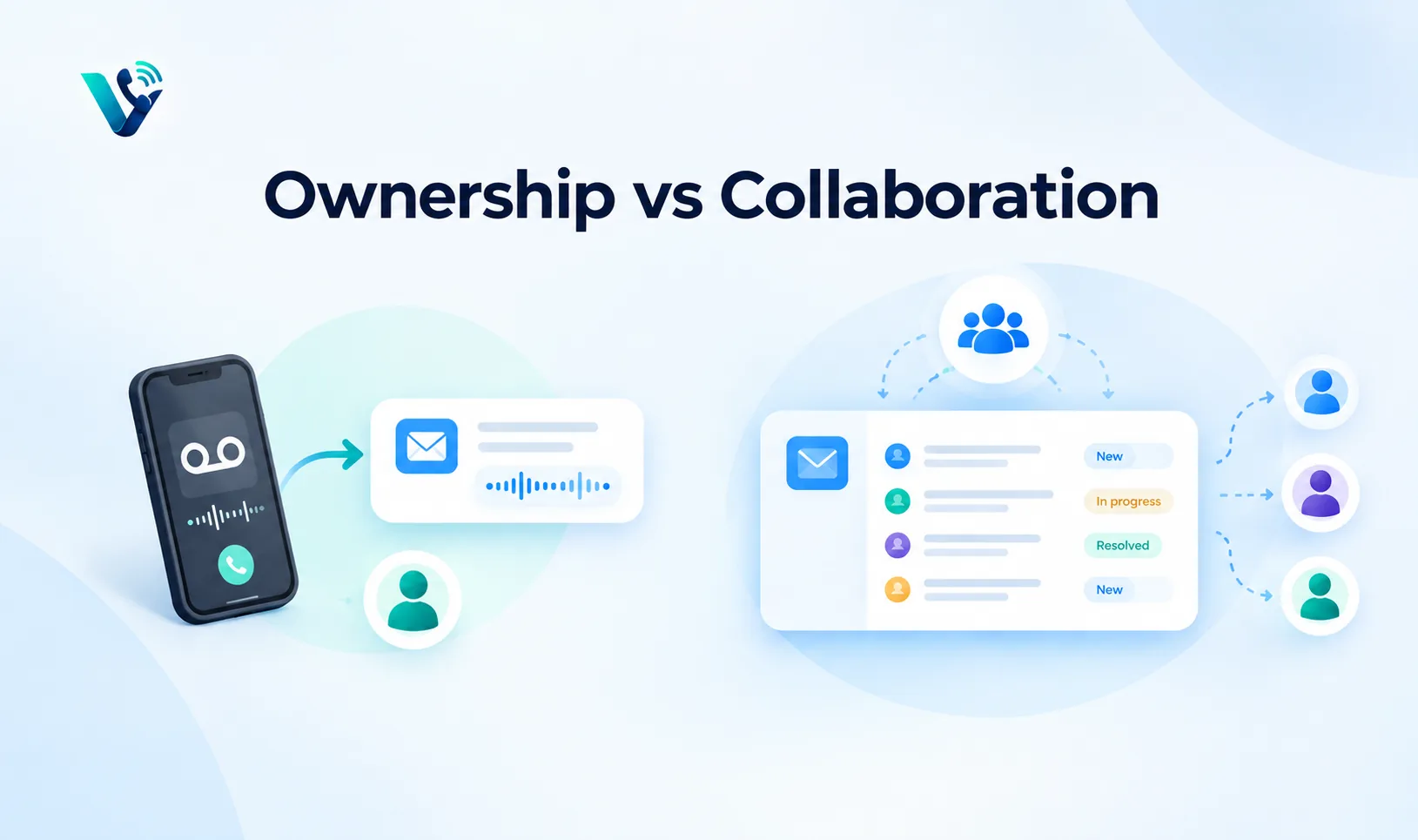
When Voicemail To Email Works Well
Voicemail to email works especially well when message ownership is obvious before the email arrives. A founder may receive all sales voicemails. A receptionist may own the main business line. A field technician may receive messages only for their own direct number. In those cases, email adds convenience without introducing a coordination problem.
It is also useful for mobile and asynchronous work. The recipient can read a transcript or play the voicemail from a phone, forward the message when necessary and keep the original audio for reference. Teams that already live in email do not need to adopt another interface just to recover occasional missed calls.
The workflow becomes weaker when email volume is high. A voicemail notification can be buried by newsletters, internal threads and automated alerts. Flags and folders help, but they rely on individual habits rather than a shared team process.
Voicemail to email is therefore strongest when call volume is moderate, the callback owner is predictable and management reporting is not a major requirement. If those conditions change, the team may outgrow the workflow even though the email delivery itself still works perfectly.
When A Shared Inbox Is Better
A shared inbox is a better fit when several agents cover the same business number or when response-time commitments matter. The value is not simply that everyone can see the voicemail. The value is that the team can see who is responsible for it and whether that responsibility has been completed.
For customer support, assignment prevents two agents from returning the same call. For inbound sales, it helps the team route a high-intent voicemail to the right salesperson instead of waiting for somebody to notice it. For managers, a shared inbox makes backlog visible without asking each employee for an update.
A shared inbox can also make shift handoffs cleaner. If one agent finishes work before a customer calls back, the next agent can see the voicemail, internal notes and previous status in one place. That is much safer than leaving the context inside a personal mailbox.
The trade-off is process. A shared inbox needs clear statuses, assignment rules and expectations. If the team creates too many categories or nobody is responsible for reviewing unassigned items, the tool can become another place where messages wait. Structure helps only when the team agrees how to use it.
Compare The Workflows
A useful voicemail to email vs shared inbox comparison should look at the work after the voicemail, not only the way the audio is delivered. The same message can reach the team in seconds in both systems, yet the follow-up experience can be very different.
Voicemail to email usually wins on simplicity, familiarity and low administration. A shared inbox usually wins on team visibility, assignment, collaboration and reporting. Email is often enough when the owner is already known; a shared inbox adds value when ownership must be decided after the message arrives.
Compare the two workflows across six questions: Can the team see who owns the message? Can another person tell whether a callback already happened? Can managers identify overdue messages? Can internal context be added without changing the customer-facing thread? Can the final outcome be recorded? Can the history be connected to the customer record?
If the answer to most of those questions does not matter for your current call volume, voicemail to email may remain the better choice. If those questions are already causing manual work, the business is probably ready for a more collaborative voicemail workflow.
Cost should be evaluated in the same way. A shared inbox may cost more in software or configuration, but repeated callbacks, forgotten voicemails and manual status chasing also have a cost. The practical comparison is not free versus paid; it is simple workflow versus coordination overhead.
The first step is to define the outcome you want from voicemail to email vs shared inbox. For most teams that means faster response, fewer abandoned interactions, clearer ownership and less manual chasing. Write those outcomes down before changing technology. Otherwise it is easy to add more routing rules, dashboards or automations without knowing whether customer experience actually improved.
Callback Speed And Service Expectations
Callback speed is one of the clearest ways to judge whether voicemail to email or a shared inbox is working. Measure from the time the voicemail is received to the first meaningful response, not from the moment an employee finally opens the notification.
For a small team, email may deliver excellent response times because the same person owns every message. For a growing team, response time can become less predictable if the email is sent to a distribution list and no individual is assigned. A shared inbox can improve consistency by creating a visible queue and ownership state.
Different voicemail types can have different targets. An inbound sales enquiry may deserve a faster callback than a routine billing question. An urgent support voicemail may need escalation if it is still unassigned after a short period. The workflow should make those priorities obvious rather than treating every message as equal.
Do not set an aggressive callback target that the team cannot maintain. A realistic 20-minute target that is measured and owned is better than a five-minute promise that is usually missed.
Use Transcription Carefully
Voicemail transcription can make both email and shared inbox workflows faster because agents can scan the message before listening to the full recording. It is particularly useful when the team receives many short messages or needs to triage urgent requests quickly.
However, transcription should be treated as a convenience layer rather than a perfect record. Names, phone numbers, account references, accents and technical terms can be interpreted incorrectly. Keep the original audio available so the agent can verify anything important before acting.
A good workflow keeps the transcript, audio and caller metadata together. If the transcript arrives in one email and the callback task is created somewhere else, agents still have to reconstruct the context manually.
For sensitive conversations, also define who can access voicemail audio and transcripts, how long they are retained and where they may be forwarded. Convenience should not turn customer messages into uncontrolled email attachments.
Reporting And Visibility
Reporting is where the difference between voicemail to email and a shared inbox becomes especially visible. Email can show that a message was delivered, but it may not provide a reliable team-level view of ownership, callback time or resolution status.
A shared inbox can make operational metrics easier to collect: new voicemails, assigned messages, time to first response, unresolved backlog, reassignment count and resolution time. Those metrics help managers see whether the workflow is keeping up with demand.
If the business stays with voicemail to email, reporting can still be improved by connecting the voicemail notification to a CRM task, ticket or call record. The email remains the alert, while the structured system becomes the place where outcome and ownership are tracked.
Whichever method you choose, avoid measuring only voicemail volume. The useful question is how many missed calls were recovered successfully and how quickly customers received the promised next action.
Recommendation By Team Size
Solo operators and very small teams can usually start with voicemail to email because the callback owner is obvious and the workflow stays lightweight. The system does not need assignment logic when one person is responsible for the number.
For teams of several people sharing sales, support or reception calls, watch for the first signs of coordination friction: duplicate callbacks, messages left unclaimed, unclear status, long response variation or managers asking who handled a voicemail. Those are stronger signals than team size alone.
Growing teams often benefit from a hybrid stage before a full migration. Keep voicemail-to-email notifications for convenience, but create a shared task, ticket or inbox item as the source of truth. That lets employees keep familiar alerts while centralising ownership.
Once callback SLAs, queue reporting or multi-shift coverage become important, a shared inbox or another structured work queue is usually easier to manage than group email alone.
A Hybrid Workflow Can Be The Best Option
Voicemail to email vs shared inbox does not always have to be an either-or decision. A hybrid workflow can use email for immediate notification while storing ownership and outcome in a shared system.
For example, a voicemail can trigger an email alert so the team notices it quickly, while a CRM or shared inbox item is created with the caller number, timestamp and transcript. The alert gets attention; the shared record controls assignment and follow-up.
This model works well during growth because it avoids forcing the team to abandon familiar email habits overnight. It also reduces the risk of creating two competing sources of truth. The rule should be simple: email tells you something happened; the shared record tells you who owns it and whether it is finished.
If the same voicemail can be updated in multiple places independently, the hybrid model becomes confusing. Choose one system for status and outcome, then keep other channels read-only or notification-focused.
Implementation Checklist
- List every business number that can generate voicemail and identify the default owner for each one.
- Decide whether the owner is known before the message arrives or must be assigned after the message arrives.
- Choose one source of truth for status: personal email, shared inbox, CRM task or support ticket.
- Define simple statuses such as new, assigned, waiting and resolved. Avoid adding categories that do not change the next action.
- Set callback targets for sales, support and general enquiries based on urgency and staffed hours.
- Keep caller number, timestamp, dialled number, voicemail audio and transcript together whenever possible.
- Create an escalation rule for messages that remain unassigned or unanswered beyond the target.
- Test duplicate-response prevention by sending the same voicemail to multiple team members.
- Verify after-hours behaviour and confirm who owns messages when the normal team is offline.
- Review privacy, retention and access rules for voicemail recordings and transcripts.
30-Day Measurement Plan
Days 1-7: Establish the baseline. Record total voicemails, time to first response, number of messages without a clear owner, duplicate callbacks and unresolved messages at the end of the day. Do not change the workflow yet; first understand where the current process loses visibility.
Days 8-14: Test the ownership model. If you use voicemail to email, assign a named owner for each number or shift. If you use a shared inbox, make assignment mandatory before work begins. Compare how many messages remain unclaimed and how often two people respond to the same caller.
Days 15-21: Measure callback quality as well as speed. Review whether agents have enough context, whether customers repeat information and whether the final outcome is recorded. A faster callback that creates confusion is not an improvement.
Days 22-30: Compare the two operating results against the baseline. Look at median callback time, percentage within target, unresolved backlog, duplicate callbacks and successful recovery rate. Keep the simpler workflow if it performs well; move to more structure only when the data shows a coordination problem.
At the end of the month, document the chosen workflow and the exact trigger that would cause the team to review it again, such as higher call volume, another shift, a larger team or a new response-time commitment.
Common Mistakes To Avoid
- Sending every voicemail to a large distribution list without defining who must respond.
- Assuming an email marked as read means the customer received a callback.
- Using too many shared inbox statuses so agents spend more time categorising than responding.
- Keeping the transcript but losing the original audio needed to verify important details.
- Measuring voicemail volume without tracking callback time, ownership or final outcome.
- Running email and a shared inbox as two separate systems of record, which creates conflicting status.
- Moving to a shared inbox only because it has more features, even when one person already owns every voicemail.
- Staying with personal inboxes after duplicate callbacks and missed handoffs have become recurring problems.
Conclusion
The choice between voicemail to email vs shared inbox should be driven by coordination, not by novelty. Voicemail to email is fast, familiar and effective when ownership is already clear. A shared inbox becomes more valuable when several people share responsibility and the business needs assignment, visibility, response targets and reporting.
The simplest useful test is this: after a voicemail arrives, can everyone who needs to know see who owns the callback, whether it has happened and what the result was? If the answer is yes with email, there may be no reason to add complexity. If the answer is no, a shared inbox or structured CRM workflow can remove a lot of manual chasing.
For most growing teams, the goal is not to eliminate email. It is to make ownership explicit. Use notifications for attention, one shared record for status, and measurable callback targets for accountability. That produces a voicemail workflow customers can rely on as call volume and team size increase.
Try this on your own numbers
Local numbers in 118 countries, AI call notes and one shared inbox. Live the same day, no contract.
How To Connect This Topic To Votelly
For Votelly, this topic fits naturally into the wider business-calling workflow. Voicemail handling sits between the missed call and the eventual callback, so the article can explain how business numbers, voicemail notifications, customer context and follow-up ownership should work together. The primary website destination is www.votelly.com.
Keep detailed product claims tied to confirmed live Votelly capabilities. The educational value does not depend on promising a specific shared-inbox feature. The article can show readers how to design a reliable voicemail process and then position Votelly as part of the cloud business-calling layer where appropriate.
This guide can also link naturally to related Votelly content on missed call recovery, after-hours call routing, overflow routing, call recording for coaching and remote call-center setup. Those topics cover the surrounding workflow before and after a voicemail is created.
Frequently asked questions
- What is voicemail to email vs shared inbox?
- Voicemail to email sends a voicemail recording or transcript to one or more email addresses. A shared inbox places the message in a collaborative queue where team members can assign ownership, add notes, track status and mark the item resolved.
- How should a small team start with voicemail to email vs shared inbox?
- If one person clearly owns callbacks, start with voicemail to email. If several people share the same number, define one source of truth for ownership and consider a shared inbox once duplicate callbacks or missed messages become recurring problems.
- What should be measured?
- Track voicemail volume, time to first callback, percentage answered within target, unassigned messages, duplicate callbacks, unresolved backlog and the final recovery outcome. These metrics show whether the workflow is actually serving customers.
- How often should the setup be reviewed?
- Review the voicemail workflow whenever call volume, team size, shift coverage or response-time expectations change. For growing teams, a monthly review of backlog and callback performance is a practical starting point.
- Can automation replace human ownership?
- No. Automation can send alerts, create tasks, transcribe messages and assign work, but a named person or team still needs responsibility for returning the call and closing the outcome.
- How can Votelly fit into the workflow?
- Votelly can be positioned within the cloud business-calling layer where live capabilities support the required voicemail, number or call-management workflow. Use www.votelly.com as the main brand destination and verify exact product features before publishing detailed claims.